
Should I turn off chat?
Meetings are designed for people to interact with each other – to share ideas and opinions.
What should you do if two people in the room have a private conversation between themselves, without sharing it with everyone else. For starters, they are extremely rude to the leadership and the audience.
I don’t have an answer for that, yet, because our focus is on the virtual audience.
Online participants are easier to control!
Zoom has a chat setting that has three options:
- No one – the button doesn’t work even if it appears in the control panel
- Host and Co-Host only – the Chat button works but the choices are the names of the host and any people elevated to a co-host. This may be several people, each identified by their name.
- Everyone in the meeting – Any participant can CHAT one-on-one with any other participant. One of the choices is “Everyone.” This online audience could have a discussion that leaves out the in-person audience.
We recommend the second choice for hybrid meetings.
This allows participants to contact the admins (us) for technical support. At the same time, this setting prevents two online participants from having a sidebar of their own.
How do Online participants speak up?
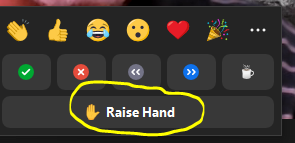
Leadership has to explain to the online audience that they “can raise their hand.” They will be called upon, and allowed to unmute their microphone to speak up.
This is a great time for Leadership to remind the in-room audience to “mind their manners” and give everyone the chance to talk – in turn.

Order!
The admin is fully involved at this point.
- He monitors the Participants list.
- The Participants list shows the order in which the audience raised their hand.
- If the “mute all” button has been checked, then the admin can allow this one participant to speak. (Click on the three buttons to the right of their name.)
- Immediately after granting this permission, the admin should lower the hand.
- This is the order of names in the participant’s box:
- First, the Host & Co-Hosts
- Next, participants with active microphones (should only be one)
- Then the participants with raised hands, in the order when they raised it
- Everyone else, listed in alphabetical order
- When the speaker is finished, then the admin should announce the name of the next person with a raised hand.
Leadership will have to balance between in-room and online questions, and move effortlessly between the two.
With this process, everyone will have the chance to speak without interruption!